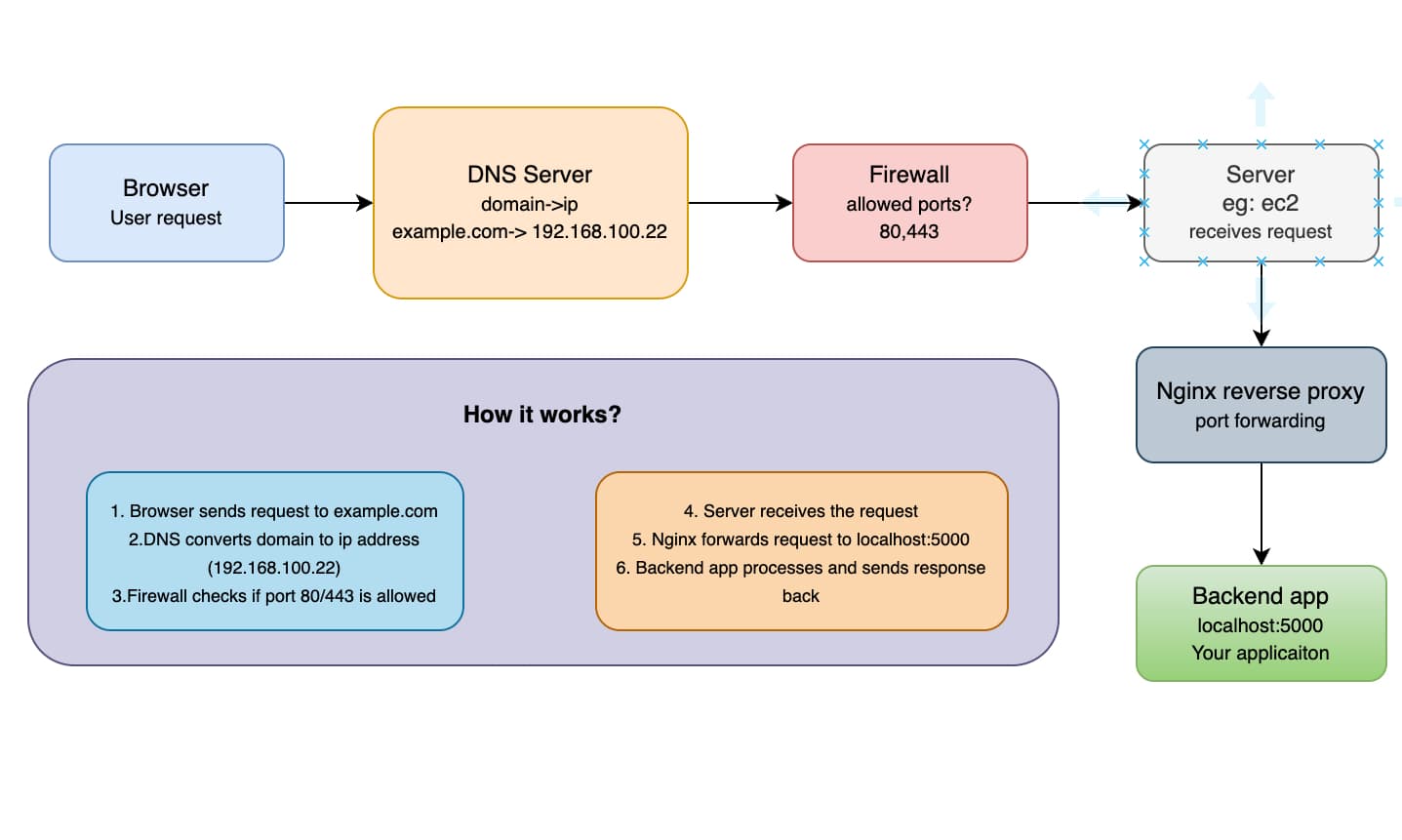
If you’ve ever opened a website and wondered “okay.. But where is all this actually coming from?”, you’re already thinking about the backend.
Backend sounds intimidating at first, but they’re really just computers doing jobs for other computers. In this post, we’ll walk though how the backend works in a practical way.
So.. What is a Backend?
A backend is a computer or server that:
- Listens for requests over HTTP, HTTPS, WebSockets. gRPC, or similar protocols
- Listens on open ports (commonly 80, 443, etc.)
- Is accessible from the public internet
- Accepts incoming data and sends data back
- Serves content like HTML, CSS, Javascript, JSON, images, and more
We call it a backend because it serves something to a client.
In short:
Backend = a server waiting on open ports for requests
A backend is simply a server ( a computer) that:
- Listens for requests on the internet
- Accepts data from clients (browsers, mobile apps, other servers)
- Processes logic
- Sends something back (HTML, JSON, images, etc.)
That’s it.
When people say “backend server”, they usually mean:
A machine running 24/7, waiting for someone to ask it for something.
The Big Picture: How a Request Travels
Let’s say someone opens:
https://example.com
Here’s the actual journey, step by step.
Step1: DNS: Turning Names Into IPs
Your browser doesn’t understand domain names. It understands IP addresses.
So it asks DNS:
“Hey, where does example.com live?”
DNS replies:
example.com -> 203.0.113.10
There are different DNS records, but the two most common are:
- A record -> domain -> IP address
- CNAME -> domain -> another domain
Once the IP is known, the browser knows which computer to talk to.
Step 2: Firewall: The Bouncer at the Door
Before your request reaches the server, it hits a firewall.
In cloud setup (like AWS), this is usually:
- Security Groups
- Network rues
These decide which ports are allowed.
Common ones:
- 80 -> HTTP
- 443 -> HTTPS
- 22 -> SSH
If port 80 or 443 isn’t allowed
❌ The request is blocked. The server never even sees it.
Step 3: Reverse Proxy: The Traffic Controller
Once inside the server, requests usually don’t go straight to your app.
Instead, they hit a reverse proxy (like nginx or apache).
Think of it as a smart middle layer that sits in front of your actual backend servers.
What a reverse proxy does:
- Handles HTTPS ( SSL certificates)
- Redirects HTTP -> HTTPS
- Routes traffic to the correct app
- Keeps configs in once place
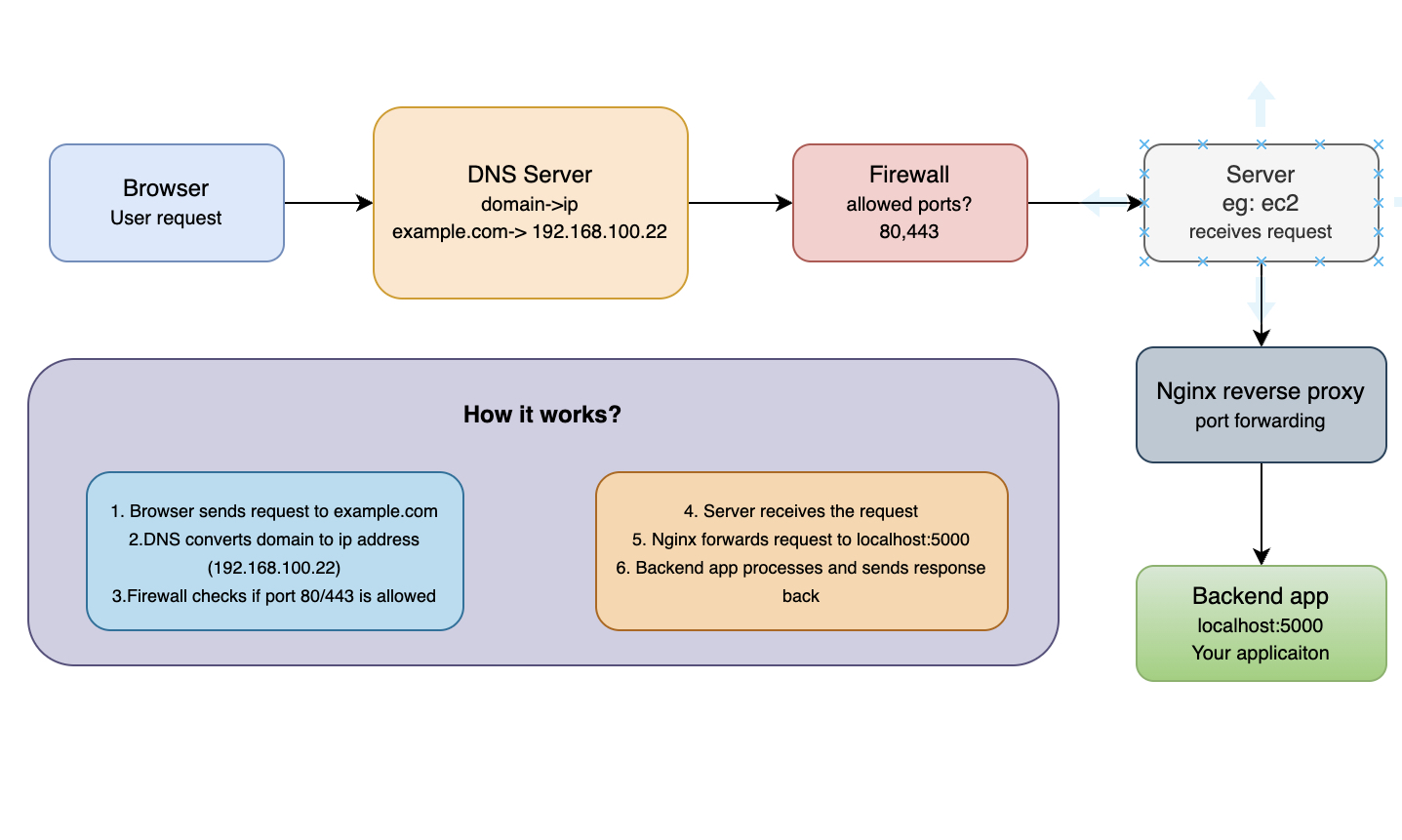
server  {
    server_name example-demo.backend.com;

    location /  {
        proxy_pass http://127.0.0.1:5000;
        proxy_set_header Host $host;
        proxy_set_header X-Real-IP $remote_addr;
        proxy_set_header X-Forwarded-For $proxy_add_x_forwarded_for;
        proxy_set_header X-Forwarded-Proto $scheme;
    }

    listen [::]:443 ssl; # managed by Certbot
    listen 443 ssl; # managed by Certbot
    ssl_certificate /etc/letsencrypt/live/example-demo.backend.com/fullchain.pem; # managed by Certbot
    ssl_certificate_key /etc/letsencrypt/live/example-demo.backend.com/privkey.pem; # managed by Certbot
    include /etc/letsencrypt/options-ssl-nginx.conf; # managed by Certbot
    ssl_dhparam /etc/letsencrypt/ssl-dhparams.pem; # managed by Certbot
}

server {
    if ($host = example-demo.backend.com) {
        return 301 https://$host$request_uri;
    } # managed by Certbot

    listen 80;
    listen [::]:80;
    server_name example-demo.backend.com;
    return 404; # managed by Certbot
}
Key points to notice:
- Nginx listens on 80 and 443 (public internet)
- HTTPS is fully handled by Certbot + Nginx
- All requests are proxied to a backend app running in localhost:5000
- HTTP traffic is redirected to HTTPS
- The backend app never handles SSL or domain logic
example-demo.backend.com -> Nginx (80/443) -> 127.0.0.1:5000 (Backend App)
Step 4: Backend App: Where the Real Work Happens
Now the request finally reaches your backend application.
This could be:
- Node.js
- Go
- Python
- Java
Here’s where:
- Business logic runs
- Databases are queried
- External APIs are called
- Responses are prepared
Then the response travels back the same path, just in reverse.
How Frontend Fits Into This
Frontend apps (React, Next.js, Angular, etc,) run inside the browser runtime.
When you open a frontend site:
- Browser downloads HTML
- Then CSS, JS, images, fonts
- Javascript runs
- UI is painted on screen
Server -> HTML
-> CSS
-> JS
Browser -> Renders UI
Frontend is about interaction and visuals.
Backend is about logic and data.
Why Not Put Everything in the Frontend?
This is the question everyone asks.
Short answer:
Because browsers are locked down on purpose.
Reason 1: Browser = Sandbox
Browser Javascript runs in a sandboxed environment.
That means:
- ❌ No file system access
- ❌ No environment variables
- ❌ No raw network sockets
Allowed things:
- DOM
- Cookies
- Local storage
- Browser APIs and other limited stuffs.
Backends don’t have these limits
Reason 2: CORS (The Browser’s Security Guard)
Browsers block requests to external APIs unless the server explicitly allows it.
That’s CORS.
Problem:
- You don’t control third-party APIs
- They may not allow your frontend domain
Backend servers:
- Don’t care about CORS
- Can talk to any external service freely
Reason 3: Databases
Databases are not meant to be accessed from browsers.
Backend servers:
- Use native drivers (Postgres, MongoDB, etc.)
- Keep credentials secure
- Maintain connection pools
Frontend apps:
- Would expose secrets
- Can’t manage persistent connections
Reason 2: Heavy Work Belongs on the Backend
Things like:
- Report generation
- Payment logic
- Data aggregation
- File Processing
Should never run on user devices.
Backend servers:
- Are more powerful
- Are controlled
- Scale properly
Reason 2: A Simple Mental Model
Frontend = “What the user sees and clicks”
Backend = “What actually makes things work”
They are different runtimes with different responsibilities.
Final Thoughts
Backends aren’t scary.
They’re just computers listening on ports, protected by firewalls, routed by proxies and running logic.
Once this mental model clicks, everything else API, auth, databases, microservices starts to make sense naturally.
If you’re here to learn full-stack development and ship real world scalable solutions, this understanding is a huge milestone.
You are no longer just copying code, you’re shipping scalable solutions.